Risks Associated with Microsoft Direct Send
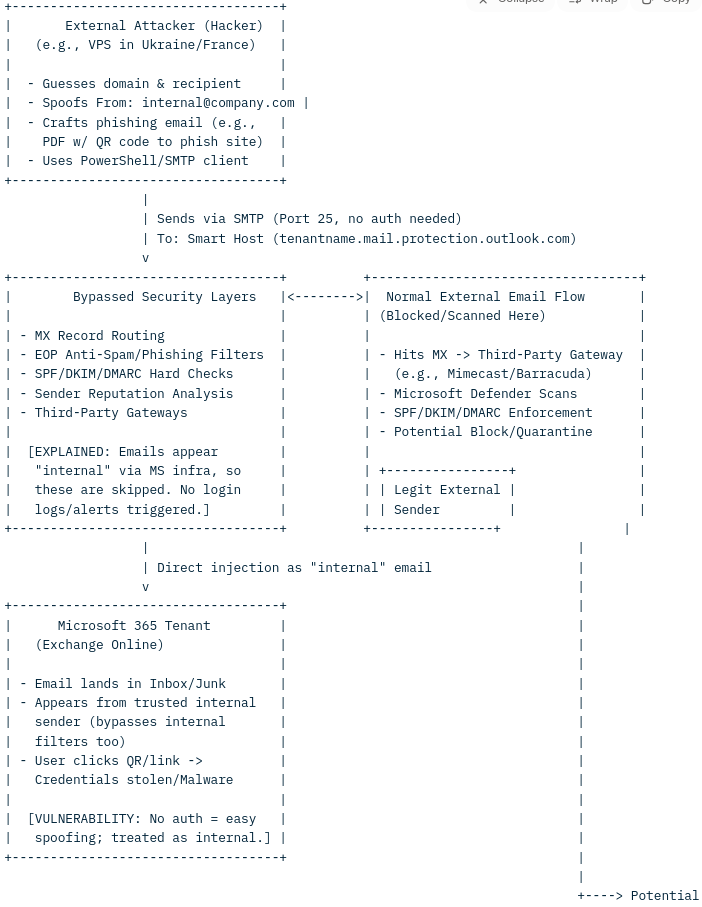
How Microsoft Direct Send Works
Microsoft 365's Direct Send is a feature in Exchange Online that allows devices, applications, or services (such as multifunction printers, scanners, or legacy applications) to send emails to internal recipients within a Microsoft 365 tenant without requiring authentication. Here’s a breakdown of how it works:
- Purpose and Design: Direct Send is intended for internal communications, enabling devices or applications that lack full SMTP authentication capabilities to send emails. For example, a networked printer might use Direct Send to email scanned documents to users within the same organization.
- Mechanism:
- Emails are sent via a tenant-specific SMTP endpoint, typically formatted as tenantname.mail.protection.outlook.com.
- The sender only needs to know the target domain and valid recipient email addresses, which can often be guessed or obtained through reconnaissance (e.g., [email protected]).
- Direct Send does not require login credentials or authentication tokens, as it leverages Microsoft’s internal infrastructure to deliver emails directly to recipients’ mailboxes.
- These emails appear as internal communications, routed through Microsoft 365’s trusted infrastructure, which makes them seem legitimate to both users and some security systems.
- Key Characteristics:
- Emails sent via Direct Send bypass traditional email authentication checks like SPF (Sender Policy Framework), DKIM (DomainKeys Identified Mail), and DMARC (Domain-based Message Authentication, Reporting, and Conformance) because they are treated as internal traffic.
- The emails are delivered directly to the recipient’s mailbox, often evading external email security gateways or third-party filtering solutions.
- Exploitation Risk: Unfortunately, this lack of authentication makes Direct Send vulnerable to abuse. Attackers can exploit it to spoof internal email addresses (e.g., impersonating [email protected]) and send phishing emails that appear to originate from within the organization. These emails may include malicious attachments (like PDFs with QR codes) or links to fake login pages to steal credentials.
Are Emails Scanned for Viruses?
Yes, emails sent via Direct Send are subject to some level of security scanning, but the process has limitations due to the nature of the feature:
- Microsoft’s Built-in Protections:
- Microsoft states that Direct Send emails undergo SPF validation and CompAuth (Composite Authentication) evaluation, though the effectiveness depends on how the organization’s MX records and security policies are configured.
- Microsoft Defender for Office 365 (if enabled) scans emails for known malware, viruses, and phishing attempts. This includes checking attachments and links for malicious content. However, because Direct Send emails are treated as internal, they may bypass some external-facing security checks (e.g., third-party email gateways or strict DMARC policies).
- Limitations in Scanning:
- Since Direct Send emails are routed through Microsoft’s infrastructure and appear as internal, they may not trigger the same level of scrutiny as external emails. This can allow sophisticated phishing emails to slip through, especially if they mimic legitimate internal communications (e.g., IT alerts or HR notifications).
- Some reports indicate that attackers have successfully used Direct Send to deliver malicious PDFs or QR codes that lead to phishing sites, suggesting that Microsoft’s default scanning may not catch all threats, particularly zero-day or highly targeted attacks.
- Third-Party Security Gaps:
- If an organization uses a third-party email security gateway (e.g., Barracuda, Mimecast), Direct Send emails typically do not pass through these external filters because they are routed internally. This creates a blind spot unless specific configurations are in place to monitor or block Direct Send traffic
Mitigating Risks and Ensuring Security
To protect against Direct Send abuse and ensure robust virus scanning, organizations can take the following steps:
- Disable Direct Send (if not needed):Set-TransportConfig -Identity Default -DirectSendEnabled $false Note that disabling Direct Send may disrupt legitimate applications (e.g., printers), so test thoroughly before enforcing.
- Enable Microsoft’s RejectDirectSend Feature:
- Introduced in April 2025, this opt-in feature allows organizations to block Direct Send traffic. However, it requires careful configuration to avoid breaking legitimate workflows.
- Monitor Direct Send Activity:Use Kusto Query Language (KQL) in Microsoft Defender XDR or Sentinel to detect suspicious Direct Send emails. For example:
kql``EmailEvents | where SenderFromDomain == "yourdomain.com" | where SenderMailFromDomain != "yourdomain.com" | where EmailDirection == "Inbound" | project Timestamp, Subject, SenderFromAddress, SenderMailFromAddressReplace yourdomain.com with your organization’s domain to identify mismatched sender domains.- Use Advanced Threat Protection:Enable Microsoft Defender for Office 365 or a third-party solution like Barracuda Email Gateway Defense to enhance scanning for phishing, malware, and suspicious attachments. These tools can provide additional layers of protection for Direct Send emails.
- User Awareness:
- Train employees to recognize phishing attempts, especially those mimicking internal communications (e.g., fake HR or IT emails with QR codes or unexpected attachments).
User Awareness:Train employees to recognize phishing attempts, especially those mimicking internal communications (e.g., fake HR or IT emails with QR codes or unexpected attachments).
Summary
Microsoft Direct Send allows unauthenticated email delivery within a Microsoft 365 tenant, making it convenient for devices like printers but vulnerable to phishing attacks. While Microsoft’s security measures (e.g., SPF validation, CompAuth, and Defender scans) apply to Direct Send emails, their internal routing can bypass external gateways and some authentication checks, creating a potential security gap. To mitigate risks, organizations should monitor Direct Send activity, consider disabling the feature if not needed, and enhance email security with advanced tools and policies.If you have further questions or need help with specific configurations, let me know!
Note April, 8 2025 : " We are working on creating a report for Direct Send traffic that admins can use to get an overview of what traffic will be impacted. " https://techcommunity.microsoft.com/blog/exchange/introducing-more-control-over-direct-send-in-exchange-online/4408790
Want to read this later? Email it to yourself.
Stay ahead of email threats
Get our latest DMARC, SPF, and email-security guides in your inbox. No spam — unsubscribe anytime.
We only use your email to send blog updates. One click unsubscribes you.