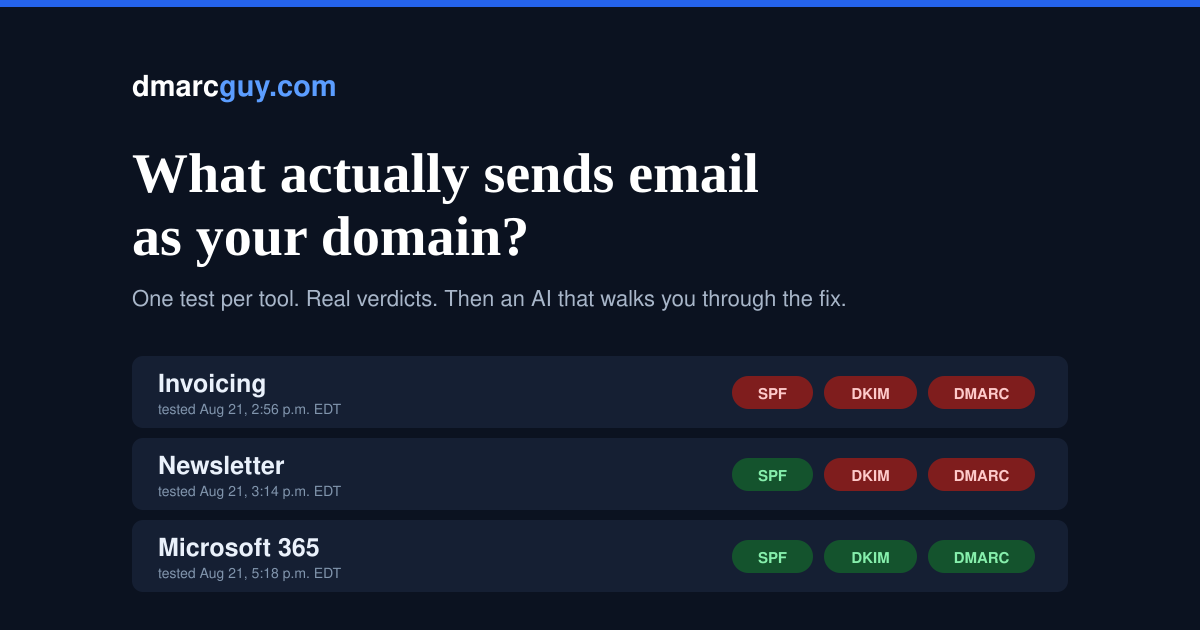
Ask a small business owner which mail server they use and you will get an answer straight away. Ask what sends email as their domain and the answer gets vague.
It is rarely one thing. The accounting software emails the invoices. The CRM sends the follow-ups. There is a newsletter tool, a booking system that confirms appointments, an e-signature service, a form on the website that notifies someone. Every one of those sends mail with your name on it — and every one of them has to prove it is allowed to, separately.
Nobody keeps that list. It never gets made, because it never gets decided. It grows one signup at a time: somebody adds a scheduling tool in March, accounting switches platforms in September, marketing tries something for a campaign and forgets to cancel it. Each addition quietly starts sending as your company.
Two ways this hurts, and you only notice one
The first is the one you eventually hear about. Your invoices land in spam. A client mentions it offhand. You check your Sent folder, the message is right there, and nothing about your own mailbox suggests a problem — because there is not one. Your staff email is fine. It is the accounting platform that was never authenticated.
The second one you never hear about at all. A message that fails authentication badly enough does not go to spam — it gets refused at the door and deleted. The prospect who never received your quote did not check their junk folder and conclude you were unprofessional. They simply concluded you never replied.
And underneath both: an unauthenticated domain is one anyone can imitate. Not to impersonate a bank — to send one convincing invoice to one of your customers, with different banking details on it. Small domains are the useful ones precisely because nobody has hardened them.
The advice that does not fit
The standard guidance is to publish a DMARC record at p=none and read your reports. That is a smoke detector wired to a notepad — it asks receiving servers to tell you about impersonation and deliver it anyway. And the reports arrive as XML attachments, which is not a thing a business owner is going to open on a Tuesday.
The other half of the advice is worse: go straight to p=reject. Do that without knowing what sends as your domain and everything unauthenticated stops arriving — invoices, appointment reminders, password resets from the booking system. Because it is the receiving servers refusing them, nothing in your own mailbox tells you it is happening.
Both pieces of advice assume you have the list. The list is the actual problem.
So we built the list
The Source Map answers one question, tool by tool: does this authenticate, yes or no — and if not, what exactly do I click?
The method is deliberately simple. You get ten test addresses. From each tool you use, you send one ordinary email to one of them. We read the message that arrives and report what the receiving side saw: SPF, DKIM, and DMARC alignment, for that specific sender.
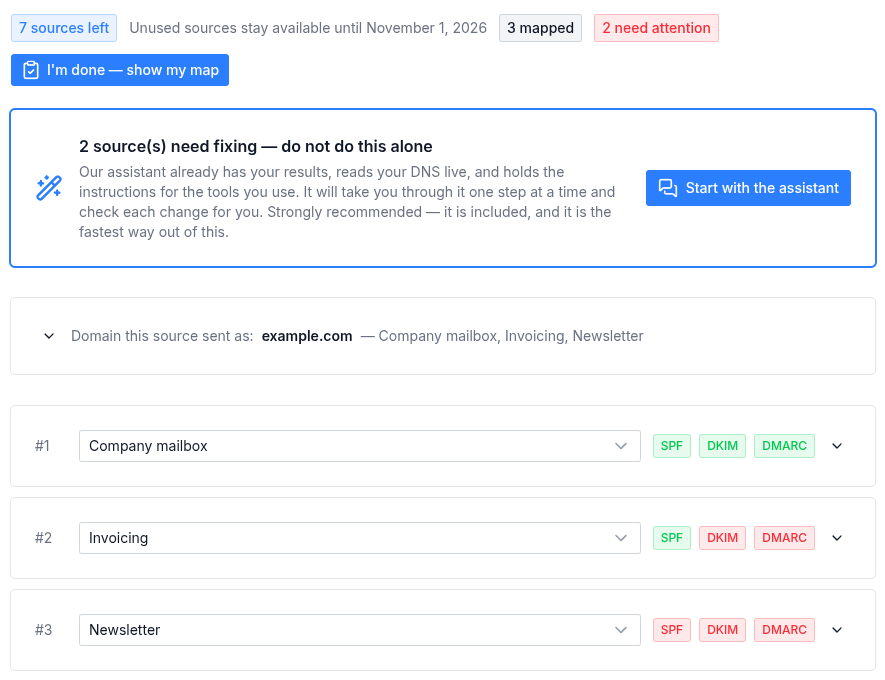
A map built from real tests, with the domain names replaced: three tools tested for one domain. One passes everything, one passes SPF but fails DMARC, one fails all three.
Nothing to install. No access to your accounts. No DNS credentials handed to anyone. Just watch each tool actually send — which is the only way to know the truth about a sender.
And you do not do the fixing alone
This is the part I would point at first, because it is the part that did not exist before.
Knowing that your invoicing tool fails DKIM is only useful if you can then fix it. That normally means finding the right page in a vendor's documentation, translating it into your DNS provider's vocabulary, and hoping you understood correctly — which is exactly where most people stop.
So the map comes with an assistant, and it is not a generic chatbot bolted to the side. It already knows your results and can read your live DNS while you talk to it. It is not answering "how does DKIM work" — it is answering "why did your newsletter tool fail, and what do you click next."
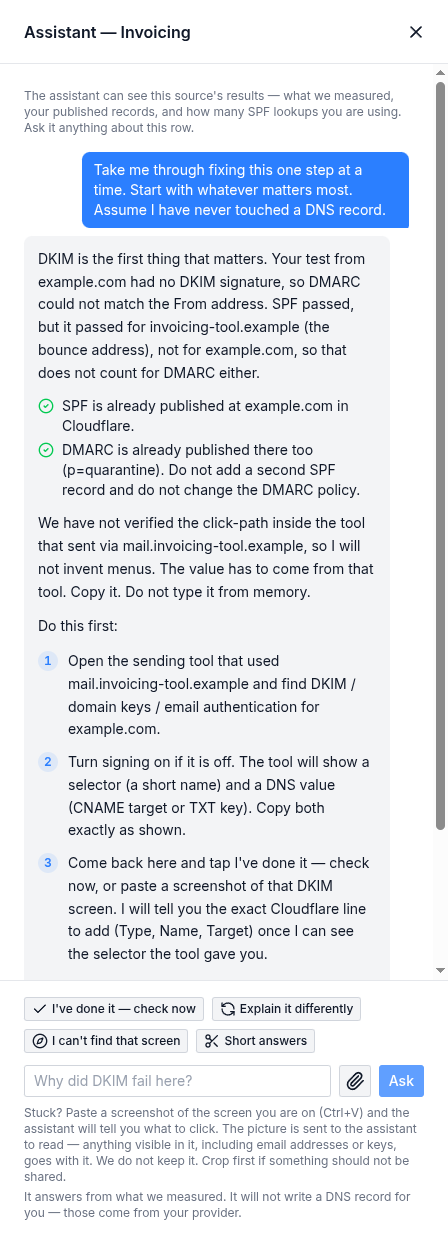
The assistant on the failing invoicing tool from the map above: what failed, why, and what to do first.
And it stays with you until it is done. You are not handed a report and left to work it out on your own. You say what you are looking at, it tells you the next single thing to do, you do that one thing, and it checks whether it worked. If it did not, it asks what is on your screen and adjusts. That loop keeps going until the row turns green — which is the only moment any of this was for.
You do not need to know what a selector is. You do not need to understand alignment. You need to be willing to follow one instruction at a time, and the rest is the assistant's job.
What that looks like in practice:
- It gives you steps, not reading. We keep verified facts about each platform — where the setting actually lives, what it is called there. The assistant turns those into plain numbered actions for your specific failure. You are not handed a documentation link and wished luck.
- One thing at a time. It is told to explain like you have never seen a DNS record, and to stop and wait rather than dumping twelve steps at once. There is a "shorter answers" toggle if you would rather have less talk.
- You can click instead of type. Buttons for "I did it", "check now", "explain that differently", "I can't find that setting".
- You can paste a screenshot. When the field names on your provider's screen do not match the instructions — which is most of the time — show it the screen. It reads it and tells you which field is wrong. That is the moment email setups usually die, and the moment support email could never handle.
- It checks, it does not guess. Say you have made the change and it queries your domain's own nameservers live and tells you whether it actually took effect. Not "that should work" — a real answer.
What it is working from is your own information
Three inputs, and only three:
- The test emails you sent us. Real messages, real verdicts — what the receiving side actually saw.
- Your DNS, read live from your domain's own nameservers. Public information, the same records any mail server in the world can look up. We do not need credentials because there is nothing private to read.
- Verified setup facts for the platforms people actually use. Not scraped, not generated — confirmed against each vendor's live console.
Platforms with step-by-step guides today
| Platforms | |
|---|---|
| Email and productivity | Microsoft 365 · Google Workspace / Gmail |
| Marketing and newsletters | Mailchimp · Klaviyo · Kit · MailerLite |
| Sales and CRM | HubSpot |
| Sending infrastructure | Amazon SES · SendGrid · Mailgun |
| E-commerce and payments | Shopify · Stripe |
More are being confirmed and will appear as they are.
Your platform is not on that list? It still works. The list is about the step-by-step, not about whether we can test you. The test works for anything that can send an email — your payroll system, your practice-management software, an in-house script, a vendor nobody has heard of. You still get the verdict for that sender, and the assistant still works from your measured result and your live DNS. What you do not get is "click Settings, then Domains" for that specific console.
And a guide only joins the list once someone has confirmed it against the live page. We would rather show you nothing than show you the wrong menu — one platform is sitting in the "written but not confirmed" pile right now because a review caught its steps in the wrong order, which would have broken mail rather than fixed it.
And what the assistant will not do, which matters just as much: it never invents a record value for you, never tells you to delete something it cannot reason about, and never contradicts what we measured. It works from your facts, not from a plausible story about your domain.
What this does not do
This matters more than the feature list.
We never touch your DNS. We could — the APIs exist and it would make a smoother demo. But the moment a vendor edits your zone, every mail problem you have for the next two years becomes an argument about who changed what. You get the exact change to make, in your provider's own terms, and a checker that tells you whether it worked. Your zone stays yours.
We do not claim your list is complete. If you never test your payroll tool, the report says we have no data on it, in those words. A tool can send as your domain without appearing anywhere in your DNS — so no honest product can tell you it found everything. You are told what is known and what is not.
We do not tell you to tighten DMARC until your senders are mapped. The report holds that recommendation back on purpose. Advice you cannot safely act on is not advice.
It is not a monitoring platform. No dashboard, no monthly seats, no report parser. One payment, one afternoon, and you know where you stand.
Who it is for
Anyone running a business on their own domains — one, or three, or five — with a handful of tools and no IT department to ask. Home offices. Clinics and contractors. Small non-profits, where the donation receipts and the volunteer emails both go out through platforms nobody has checked.
The ten tests are yours to spend however you like. All ten on one domain, or spread across every domain you own. Each one is reported separately, and each domain gets its own verdict.
If you have a deliverability team, you do not need this — you need the monitoring products, and you already know it.
Honestly
I have worked in email for thirty years, from home offices to environments with forty thousand mailboxes. The same conversation kept happening, an hour at a time, and it was always the same first hour: what sends as you, and does it authenticate.
That first hour is what this is. If it does not help you, write to me and I will refund it — no form, no questions. It is built to answer the common cases on its own, and it is no substitute for someone looking at your particular situation. When it is not enough, your money back and an offer of the thing it could not be is the only honest response.
$99 CAD / $69 USD, one payment. See the Email Source Map
Want to read this later? Email it to yourself.
Stay ahead of email threats
Get our latest DMARC, SPF, and email-security guides in your inbox. No spam — unsubscribe anytime.
We only use your email to send blog updates. One click unsubscribes you.