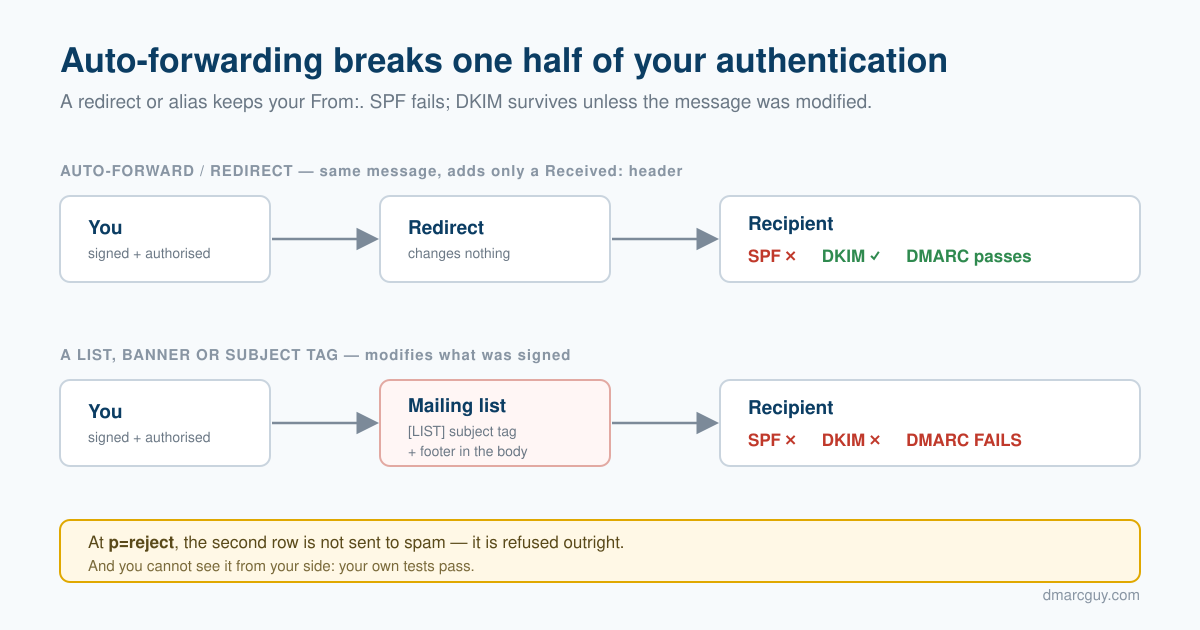
You test your domain and everything passes. SPF, DKIM, DMARC, all green. Then a customer mentions that a message you sent never arrived — and when you dig in, it turns out they had it forwarded to another address.
That is not a coincidence, and it is not a flaw in your setup. Automatic forwarding breaks email authentication in a specific, predictable way. Once you know the mechanism, the failures stop looking random.
First — which kind of forwarding?
Two quite different things share that word, and only one of them is a problem. This trips people up constantly, so it is worth thirty seconds.
Hitting "Forward" in your mail client is fine. You press the button, maybe add a line of your own, and send. That creates a brand-new message from your address, with the original quoted underneath or attached. It is authenticated as your domain, with your SPF and DKIM. The original sender's authentication is not being checked at all — nothing of theirs is on trial. That message arrives normally.
Automatic forwarding is the one that breaks. A redirect rule, a mailbox alias, a "send a copy of everything to my other address" setting, a mailing list. These relay the same message onward, keeping the original From: header. Your recipient still sees the mail as coming from the original sender — so the receiving server is still checking that sender's SPF and DKIM, except the message is now arriving from somewhere else entirely.
That is the whole problem in one sentence: the message still claims to be from you, but it is no longer coming from you.
Everything below is about the second kind. If you forward things by hand, none of it applies to you.
SPF does not survive a new hop. Ever.
SPF works by checking the IP address that is connecting. Your SPF record is a list saying "these servers are allowed to send as my domain." A receiver sees a connection, looks at the IP, and checks it against your list.
Now put a forwarder in the middle. Your customer's mailbox forwards everything to another address. That forwarder connects to the next server from its own IP address — which is not in your SPF record, because you have never heard of it.
So SPF fails. There is no configuration that avoids this, and nothing is broken. SPF is checking "did this come from an authorised server", and the honest answer is no: it came from a forwarder.
The precise rule is worth stating carefully, because "forwarding" covers two different things. What kills SPF is a new connection from an IP you never authorised. A same-server alias — mail redirected inside the same system, without a fresh SMTP connection — never triggers a second SPF check at all, so nothing fails. It is the hop to a different server that does the damage.
The exception that is not one
Some forwarders use SRS, which rewrites the envelope sender to their own domain. SPF then passes — but it passes for the forwarder's domain, not yours.
DMARC does not just ask whether SPF passed. It asks whether the domain that passed matches the domain in the From: header your recipient sees. After SRS, those are two different domains. The match fails, and so does the SPF half of DMARC.
SRS rescues plain SPF checks. It does not rescue DMARC. This distinction catches a lot of people out.
DKIM is the half that can survive — under one condition
DKIM does not care about IP addresses. It attaches a cryptographic signature to the message itself. A forwarder can pass the message through as many hops as it likes, and the signature still verifies at the end.
Provided nothing changed the parts of the message it signed.
A DKIM signature covers exactly two things:
- the body of the message
- a specific list of headers, named inside the signature — usually
From,To,Subject,Date,Message-IDand a couple of others
Change either, and the signature no longer matches. Not "gets weaker" — fails outright.
What breaks a signature
| What happens | Who typically does it |
|---|---|
| Anything is added to the body | mailing-list footers, "scanned by" notices, warning banners |
| A signed header is modified | subject tagging — [LIST], [EXTERNAL], [SPAM] |
| The message is re-encoded | MIME rewrites, character-set or line-ending changes |
| Signed headers are removed or reordered | aggressive gateways |
What does not break it
Adding brand-new headers is harmless. Received:, X-Anything, Authentication-Results: — none of them were in the signed list, so the signature never notices them.
This is the crucial asymmetry, and it explains everything: a plain forwarder only adds a Received: header. It touches nothing that was signed. That is why simple forwarding survives DKIM while mailing lists do not.
The practical rule
| What the mail passes through | Does DKIM survive? |
|---|---|
A plain forward, an alias, a .forward rule | ✅ Yes, reliably |
| A mailing list that tags the subject or adds a footer | ❌ No, reliably |
| A filter that adds a warning banner to the body | ❌ No |
A gateway that only adds X- headers | ✅ Yes |
Read that table again with your own mail flow in mind. If your customers use a security gateway that stamps [EXTERNAL] on subjects from outside their company — and a great many do — then the copy sitting in their mailbox no longer carries a valid signature from you.
When this actually bites — the part that is easy to get wrong
It would be natural to read that and conclude your mail is failing at your customer's door. It is not, and the distinction matters.
A receiving mail server checks authentication first, on the message exactly as it arrived. Only then does it tag the subject or add its banner. So your message passed SPF, passed DKIM, passed DMARC, and was delivered normally. Nothing was rejected.
What the modification breaks is the copy that now sits in the mailbox — and therefore the next hop. When your recipient forwards that message to their accountant, their colleague, or their own second address, the forwarded copy carries a signature that no longer matches the modified content. That is where it fails.
So the accurate statement is not "gateways reject your mail." It is: gateways make your mail unforwardable, silently, by rewriting it after they have finished authenticating it.
The tools protecting your recipients are frequently the ones breaking your signature. Not through carelessness: a banner warning someone that a message came from outside is genuinely useful, and it cannot be added without modifying the body.
Including ours — an honest example
It would be easy to leave that as a general observation. It is more useful with a name on it.
The same person writes DMARC Guy and runs LastSpam, an antispam service. LastSpam does all three of the things listed above. It rewrites the Subject to tag suspicious mail. It rewrites Content-Type. It injects an HTML banner into the body warning the recipient about external or risky senders.
Every one of those invalidates the sender's DKIM signature on the delivered copy. Not occasionally — by design, on every message it modifies.
To be precise about the order, since it is the thing this post nearly got wrong: LastSpam authenticates the message first, and its verdict is based on the message as it was received. The rewrite happens afterwards. It does not reject a legitimate sender at the door because of its own banner. What it does is hand the recipient a copy that will no longer verify if they forward it.
"Then why does my own mail system accept it?"
Because it has been told to. When a company puts a filtering service in front of its mailbox provider, it configures that provider to trust mail arriving from the filter — that is the whole point of the arrangement. Microsoft 365, Google Workspace and the rest all have a mechanism for it. The filter has already done the authentication work, so the mailbox provider does not repeat it.
That is why a modified message still lands cleanly in the inbox. The signature is broken, but nothing downstream of the filter is checking it any more.
The bill arrives later, and somewhere else: the moment that message leaves the trusted perimeter. A forward to an outside accountant, a redirect to a personal address, a mailing list — none of those inherit the trust, and all of them see a signature that no longer matches.
Its own X-LastSpam-* headers are harmless, because new headers were never signed. The subject rewrite and the banner are the problem, and they are also the features customers specifically ask for. A banner that warns someone a message came from outside their company is worth having. It cannot be added without touching the body, and touching the body invalidates the signature.
So the honest position is not "well-behaved gateways don't do this." Nearly all of them do, ours included, and the ones that warn users most usefully break signatures hardest. It is a genuine trade-off between two things you want, not a bug anyone has failed to fix.
This is exactly the problem DKIM2 sets out to solve. Not by asking intermediaries to stop modifying messages — they have good reasons — but by letting them record what they changed, verifiably, so the receiver can reverse it and check the original signature. An intermediary could add its banner and still let your DKIM verify at the far end. That is why it is worth caring about a draft specification that almost nothing implements yet.
Why this combination is dangerous at p=reject
Take the two halves together.
For directly delivered mail, you are fine. SPF passes, DKIM passes, DMARC passes.
For forwarded mail, SPF has already failed — guaranteed. DKIM is now the only thing standing between your message and your own DMARC policy. If something in the chain modified the message, DKIM fails too, both halves are down, and DMARC does what you told it to. At p=reject, that usually means the message is refused outright rather than filed in spam — though this is the policy's intent rather than a guarantee. Receivers apply their own judgement, and some large providers still quarantine p=reject mail instead of rejecting it, depending on the sender's reputation.
And here is the part that makes it genuinely nasty: you cannot see any of this from your side. Your test tools pass. Your own mail arrives. The failure happens only on forwarded paths, only for some recipients, and it is invisible until somebody tells you — which they often do not, because from their perspective you simply never replied.
How to tell which half failed
When you can get hold of a message that arrived, look at its Authentication-Results header. It is added by the receiving server and it spells out exactly what happened:
dkim=fail (body hash did not verify)— the body was modified. A footer, a banner, a re-encoding.dkim=failwith a signature mismatch but the body hash intact — a signed header was changed. Almost always subject tagging.spf=failon a forwarded message — expected. Not your problem to fix.
That one distinction — body hash versus header mismatch — tells you what kind of intermediary you are dealing with, and it takes ten seconds to read.
What you can actually do
Make sure DKIM is signing at all, and signing correctly. For forwarded mail it is not a nice-to-have — it is the only half with a chance of surviving. A domain relying on SPF alone has no forwarding resilience whatsoever.
Keep your signature tolerant. DKIM has a "canonicalization" setting that decides how fussy it is about trivial changes. The forgiving mode, relaxed/relaxed, tolerates whitespace and header-case differences that would otherwise break things. It is the sensible default and most senders should be on it.
Do not read forwarding failures as a broken setup. If your direct mail authenticates and your forwarded mail does not, your configuration is very likely correct. What you are seeing is the mechanism, not a mistake.
Be deliberate before moving to p=reject. Enforcement is the right destination. But go there having looked at your DMARC reports, knowing which of your recipients forward and what their intermediaries do to your messages — not on the assumption that a green test result covers every path.
The industry knows, and is trying to fix it
This problem is old enough to have produced its own workaround. ARC lets an intermediary that knowingly breaks DKIM attach a note saying "this passed authentication when I received it." It works — but only if the final receiver trusts that intermediary's word, which turns a cryptographic guarantee into a reputation question.
The newer effort, DKIM2, aims at the actual cause rather than the symptom: it lets an intermediary record what it changed in a verifiable way, so a receiver can undo the modification and check the original signature. That is a real improvement rather than a rename, because it removes the need to take the intermediary's word for it — you verify the original signature yourself after reversing the change, instead of trusting an assertion. It is not trustless: the hop that wrote the recipe still signed it. But it moves the question from reputation back towards cryptography.
DKIM2 is still a draft and essentially nothing verifies it yet. But the fact that serious people are working on it should tell you something: forwarding breaking authentication is not an edge case you have stumbled into. It is one of the genuinely unsolved problems in email.
Want to know whether your domain is authenticated properly in the first place? DMARC Guy checks SPF, DKIM and DMARC and tells you in plain language what to fix.
Want to read this later? Email it to yourself.
Stay ahead of email threats
Get our latest DMARC, SPF, and email-security guides in your inbox. No spam — unsubscribe anytime.
We only use your email to send blog updates. One click unsubscribes you.