Your newsletter can put your invoices in spam

If you only remember one sentence, remember this one: every tool that sends as yourcompany.com spends the same reputation, and any one of them can spend it for all the others.
Count them. Microsoft 365 for your staff. A CRM for follow-ups. A newsletter tool. A helpdesk that answers customers. The accounting software that sends the invoices. In most small and mid-sized organizations, every one of them sends as @yourcompany.com.
It works, sometimes for years. That is the trap.
Fair warning: this one gets technical. We are not trying to give anyone a headache. If your head starts to hurt, skip to the no-headache version at the bottom. It is there on purpose, and nobody is grading you.
One name, one reputation
Gmail, Outlook and Yahoo do not only judge the server a message came from. They also judge the domain that signed it. Google puts it plainly: the reputation in its Postmaster Tools is for "the exact domain used for DKIM and SPF authentication" (Google). Yahoo: "Each IP and DKIM domain has a reputation, which can impact the delivery of your email" (Yahoo).
Your tools send from different servers: Microsoft's, the CRM vendor's, the newsletter platform's. Those servers each have their own reputation. But if all of them sign as yourcompany.com, they share one domain reputation. The newsletter goes out to an old list, complaints pile up, and the next invoice from accounting and the next reply from your support team go out under the same damaged name.
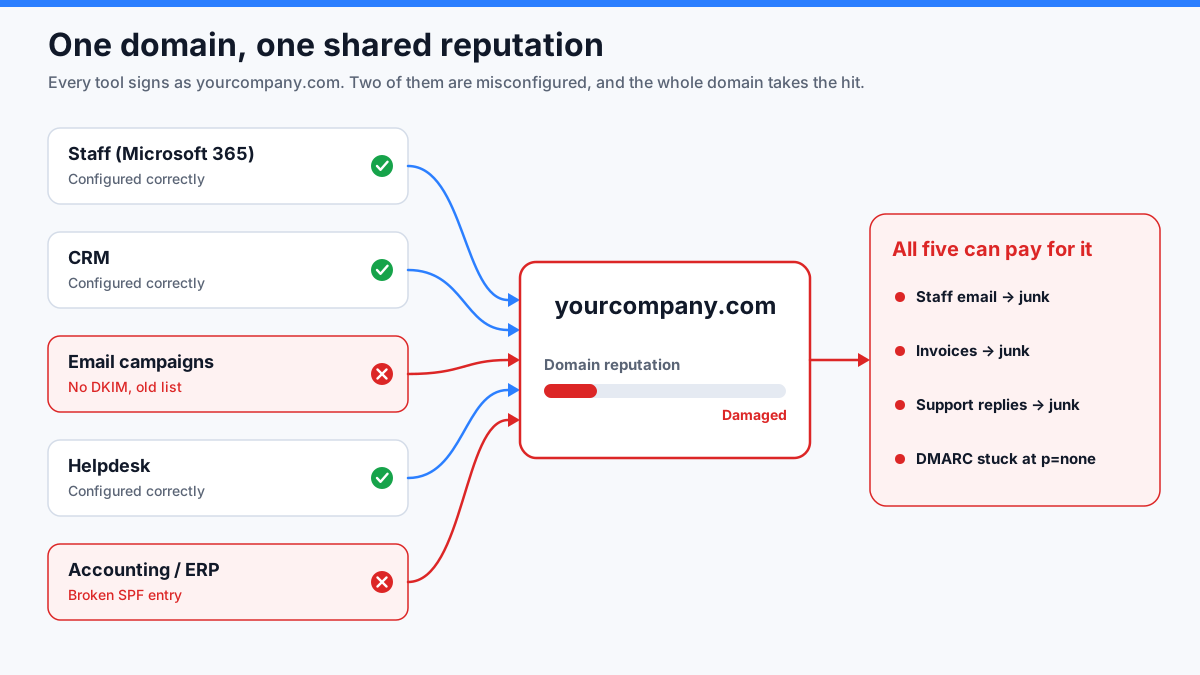
Two ways one tool drags the others down
It sends badly. An old list, a campaign nobody asked for, a wave of bounces. Complaints and bounces count against the domain the mail was authenticated with. That is your domain.
It is set up badly. This one is quieter. DMARC passes if either SPF or DKIM lines up with your domain, and by default many sending platforms put the technical bounce address on their own domain, so SPF does not line up for them. That leaves DKIM. A tool that never turned on DKIM for your domain fails DMARC on every message it sends. As long as it is running you cannot move your DMARC policy to quarantine or reject without blocking it. The whole domain stays at p=none, open to anyone who wants to send as you, because one tool was never finished.
And one mechanism hits every tool at once, Microsoft 365 included.
SPF has a hard limit of 10 DNS lookups. Every include: you add for a tool costs at least one, often several, because vendors nest their own includes. Past 10, SPF returns a permanent error, and any message whose check needs those extra lookups fails SPF. Microsoft 365 is usually the first entry in the record, so it may still pass while the tools listed after it fail. The limit is fixed at 10 (RFC 7208). What moves is your count: a vendor adds another nested include: on their side, and one morning you are over without having touched anything. Microsoft's documentation points out a second trap: if a vendor's include: domain stops resolving, or loses its SPF record, your SPF fails the same way. A mistake in someone else's DNS breaks yours. (DKIM can still carry your mail through DMARC when SPF breaks, which is one more reason it matters. But the tools past the limit stay broken until someone notices.)
"It has worked for a year." That proves nothing.
Everyone says it, and it is usually true. It is not the question.
Every platform you use will have a bad day eventually, and you will not choose which one:
- A vendor adds servers and its SPF include grows past your lookup budget. You changed nothing.
- A vendor rotates its DKIM keys and the record you published two years ago stops matching.
- Someone phishes the password of a marketing or CRM account and sends through that platform. The mail is signed with your domain and passes every check. That is exactly why attackers like hijacked accounts on real platforms.
- The vendor itself is breached, or has an outage in its own DNS.
- Someone in IT tidies up the DNS and deletes a record that "looked old."
- You cancel a tool and leave its records in place.
Most of that is not your team's fault, and none of it announces itself. When every tool shares one domain, whichever one fails, it fails on the name your people and your invoices use.
Give each tool its own subdomain
The fix is old, boring, and recommended by the mailbox providers themselves. Microsoft, in its SPF documentation:
For email services that aren't under your direct control (for example, bulk email services), we recommend using a subdomain (for example, marketing.contoso.com) instead of your main email domain (for example, contoso.com). You don't want issues with mail sent from those email services to affect the reputation of mail sent by employees in your main email domain. — Microsoft Learn
Yahoo frames it around sending servers, but the principle is the same. It says "Each IP and DKIM domain has a reputation," and "By segregating your email according to function, you help ensure that your mail receives the best delivery possible" (Yahoo). Your own subdomain gives each function its own DKIM domain.
Note Microsoft's test: services that aren't under your direct control. That is the whole argument above. You do not control a vendor's servers, its keys, its DNS or its customers' passwords.
In practice, it looks like this:
| Sends | From address | Domain |
|---|---|---|
| Your staff (Microsoft 365, Google Workspace) | [email protected] | main domain |
| Newsletter / campaigns | [email protected] | its own subdomain |
| CRM follow-ups | [email protected] | its own subdomain |
| Helpdesk | [email protected] | its own subdomain |
| Invoices | [email protected] | its own subdomain |
Each subdomain gets its own SPF record (with its own budget of 10 lookups), its own DKIM key and its own DMARC record. One detail on SPF: it checks the bounce address, not the From:. The subdomain's own SPF budget only helps when the tool's bounce address is on that subdomain. If the bounce address stays on the vendor's own domain, the SPF win is simpler: delete that vendor's include: from your main record. Google shows each one as a separate domain reputation in Postmaster Tools.
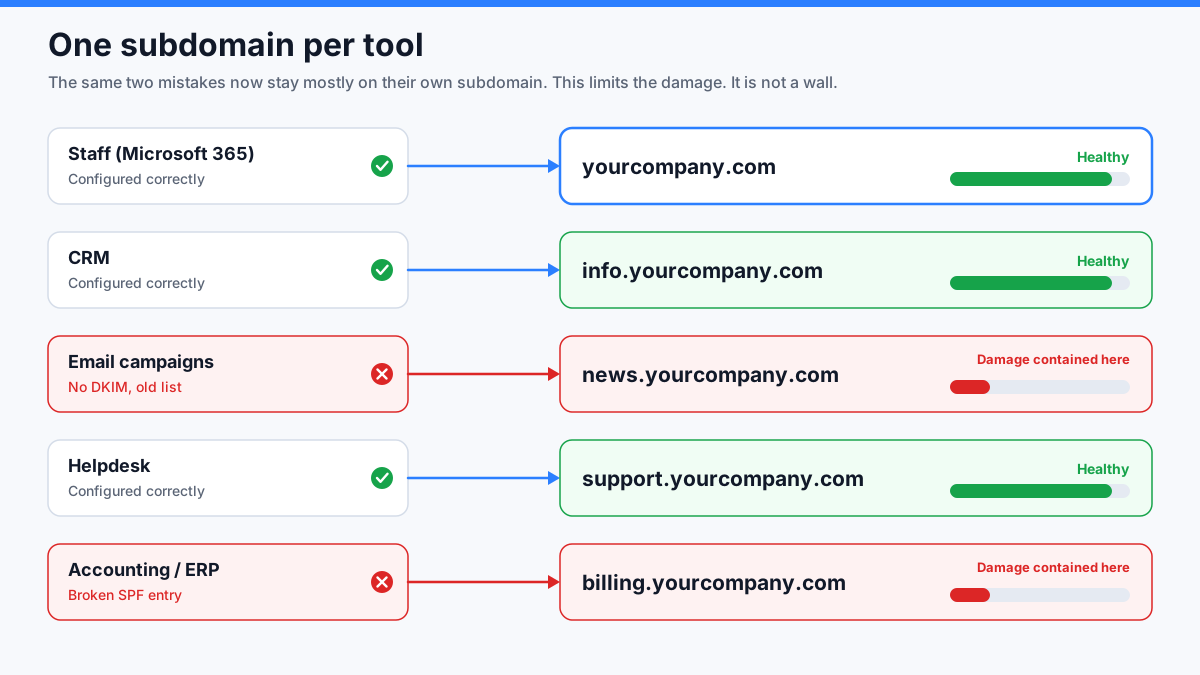
Two conditions, or it does nothing. The address people see in From: must be on the subdomain, and the DKIM signature must be for the subdomain. A tool that still sends From: [email protected] is still using your main domain, whatever its technical bounce address says. Many platforms already put that bounce address (the envelope sender) on a subdomain like bounce.yourcompany.com. That is plumbing, not segmentation: DMARC judges the From: line, your reader sees the From: line, and the "report spam" click lands on the From: line. Check a message that actually arrived, not the vendor's setup page.
Per tool, or per audience?
This is where people disagree. Our answer: per tool first.
What breaks is almost always a tool: its keys, its SPF include, its servers, its accounts. One subdomain per tool means a failure stays in one place. When a subdomain has a problem, its name tells you which vendor to call.
The audience, or more precisely the kind of mail, is the second split. You only need it when one tool sends two very different kinds of mail. Microsoft's own example is exactly that: m.contoso.com for marketing, t.contoso.com for transactional (Microsoft Learn). If the same platform sends your newsletter and your password resets, split them. Newsletters collect complaints. Password resets do not, and you do not want a promotion to be the reason a reset lands in junk.
Two practical tips:
- Name subdomains by purpose, not by vendor.
news.survives the day you switch newsletter platforms. A vendor's name in your DNS also tells an attacker which platform to target. - Do not create twenty. Each subdomain is a DKIM key to rotate, a DMARC record to watch, and someone who has to own it. One per sending tool is plenty.
What a subdomain will not do
This is the part most articles skip. A subdomain limits the damage. It does not erase it.
- It is not a wall. Google's compliance status in Postmaster Tools is reported for the primary domain only, and Google says it is built using data from the subdomains too (Google). A badly-behaved subdomain can make the whole domain look non-compliant.
- Volume is added together. Google counts every message from the same primary domain toward its bulk-sender threshold of 5,000 a day. Its own example: 2,500 from
solarmora.complus 2,500 frompromotions.solarmora.commakes a bulk sender. Google also says that classification never expires (Google). - It is not a fresh start. Receivers can see that
news.yourcompany.combelongs toyourcompany.com. No provider publishes exactly how reputation flows between the two, but it is widely observed that a bad main domain drags its subdomains with it. Creatingmail2.yourcompany.comto escape a bad reputation does not work. - It does not fix shared servers. If a tool sends from servers shared with the vendor's other customers, their behaviour still affects you. That is the server's reputation, and a subdomain does not touch it.
- On its own, it does not stop a compromised tool from spoofing your main domain. By default, DMARC accepts a signature from any subdomain as good enough for the main domain (this is called relaxed alignment). The platform holds the private key that signs for
news.yourcompany.com. If that platform's systems are breached, the attacker can sign a messageFrom: [email protected]with that key, and it passes DMARC for your main domain. You can close that by requiring an exact match on the main domain's DMARC record:adkim=s(andaspf=sfor SPF).
⚠️ Do not switch on strict mode because you just read about it.
adkim=sandaspf=sare the most dangerous settings in this article. Many tools that look fine today pass DMARC only because relaxed mode forgives them: a newsletter or CRM that signs with a subdomain likeem.yourcompany.com, or a tool whose bounce address sits onbounce.yourcompany.comand has no DKIM signature for your domain at all. Both showFrom: @yourcompany.comand both pass today. Switch to strict with either one still in place and its mail fails DMARC the same day, with nothing in your own mailbox to warn you. Your invoices, your newsletter or your password resets just stop arriving.Strict mode is the last step, not the first. Read your DMARC reports for at least two to four weeks, confirm that every source still sending
From:your main domain passes with a DKIM signature for exactly that domain, and only then change the tag. If you are not sure how to read those reports, this is the one to get help with.
In this order, over weeks, not in one afternoon
Every step below changes how real mail is delivered. Do one, watch your DMARC reports for a week or two, then do the next.
- List every tool that sends as your domain. Nobody has this list. That is normal, and it is the first real problem.
- Count your SPF lookups. If you are near 10, you are one vendor change away from breaking everyone's mail.
- Move the tools you do not control to subdomains, one each, with their own SPF, DKIM and DMARC. Start with whatever sends the most, usually the newsletter.
- Send a real message from each tool through a checker. Confirm the
From:and the DKIM signature are both on the subdomain. - Clean the main domain. Remove the old includes and DKIM records, including those of tools you cancelled.
- Then enforce DMARC on the main domain.
- Only at the very end, and only if the reports are clean, consider strict mode (
adkim=s). Read the warning above first. If anything in your reports still passes with a subdomain signature or a subdomain bounce address, leave strict mode off.
The no-headache version
If you skipped straight here, welcome. Put the kettle on. Here is everything that matters, in three lines:
- Every tool that sends as your domain shares one reputation. One badly-behaved or badly-configured tool can hurt all your mail, your staff's included.
- Give each outside tool its own subdomain, like
news.yourcompany.com, for both the address people see and the DKIM signature. It will not make you immune, but a mistake stays in one corner instead of spreading everywhere.- Go slowly. Change one thing at a time, watch your DMARC reports, and do not touch strict mode (
adkim=s) unless you know exactly what sends as you.
The rest of the article is the why. You can come back for it on a day with more coffee.
Pass it on
Someone in your organization is about to connect a new tool "to send as our domain, it only takes five minutes." Send them this first.
Check your own domain free. If you are not sure which tools send as you, the Email Source Map tests each one and walks you through fixing the ones that fail: $99 CAD, one-time, up to 10 sources.
Want to read this later? Email it to yourself.
Stay ahead of email threats
Get our latest DMARC, SPF, and email-security guides in your inbox. No spam — unsubscribe anytime.
We only use your email to send blog updates. One click unsubscribes you.